How do we make trusted cancer information accessible to English-speaking internationals?
Tools: Tools: Python (Pandas, Requests, BeautifulSoup, Sentence-Transformers, SQLite, Matplotlib), DeepL API, Excel, Tableau, Glide
Skills: Web Scraping, Data Cleaning, Translation Pipelines, Embedding-Based Classification, Data Visualisation, Stakeholder Communication
Roughly 10,000 English-speaking internationals are diagnosed with cancer in the Netherlands each year. Trusted health information exists, but it is written in Dutch and spread across dozens of websites, on top of an unfamiliar healthcare system. Cancer Support Netherlands (CSN) is a community-led charity supporting 130+ internationals in exactly this position.
CSN commissioned this LSE Employer Project to build the data foundation for a future Patient Navigator. The brief was to collect, translate and organise trusted Dutch content into a structured English-language dataset. It had to be cheap, simple for non-coders to update, fully source-identified, dated and re-scrapable.
Key findings were that Orientation content is well covered, First 48 Hours is critically thin, official sources skew towards procedural stakeholders, and overlaps between sources add real value without duplicating content.
STEP 1: Building the dataset
Five approved sources (kanker.nl, rijksoverheid.nl, thuisarts.nl, zorginstituutnederland.nl and nfk.nl) were scraped with Python, producing 144 pages. Scraping needed fixing early on. Imprecise selectors let toolbar and sidebar text leak into pages, and the scraper stopped at the first content block, silently dropping most sections of multi-section kanker.nl pages. Selectors were re-checked site by site and all matching blocks are now joined.
Pages were translated with DeepL using a 23-term healthcare glossary. Long pages were split at sentence boundaries rather than fixed lengths, so no sentence was cut mid-thought. Translations are cached, so a page is only re-sent when its Dutch text changes, which protects the free-tier quota.
STEP 2: Structuring and classifying
Every page was fitted to one 14-field schema covering source, URL, Dutch and English text, topic, patient journey stage, stakeholder, community question, summary, next step and priority. Fixing the schema first meant the brief’s four retrieval dimensions (topic, stakeholder, action and source) could all be answered from the same 144 rows.
Classification used sentence embeddings and cosine similarity rather than keyword matching, since patients phrase questions in ways keyword rules can’t anticipate. It runs in a hierarchy of topic, then question header, then specific question, each level constrained by the one above. Testing exposed two bugs. Bare header labels such as “Referrals and process” carried too little meaning, so insurance pages landed under the wrong header. Re-scoring each header against the questions filed under it took the insurance-cost question from no matched pages to over 35. Substring matching also tagged “clinical trial” pages as Hospital, which word-boundary matching fixed.
CSN’s original 17 community questions were extended to 22 after manual review found pages with nowhere to go. Automated tagging classified roughly three-quarters of pages correctly first time. The rest were corrected by hand in Excel.
STEP 3: Designing for CSN, not for coders
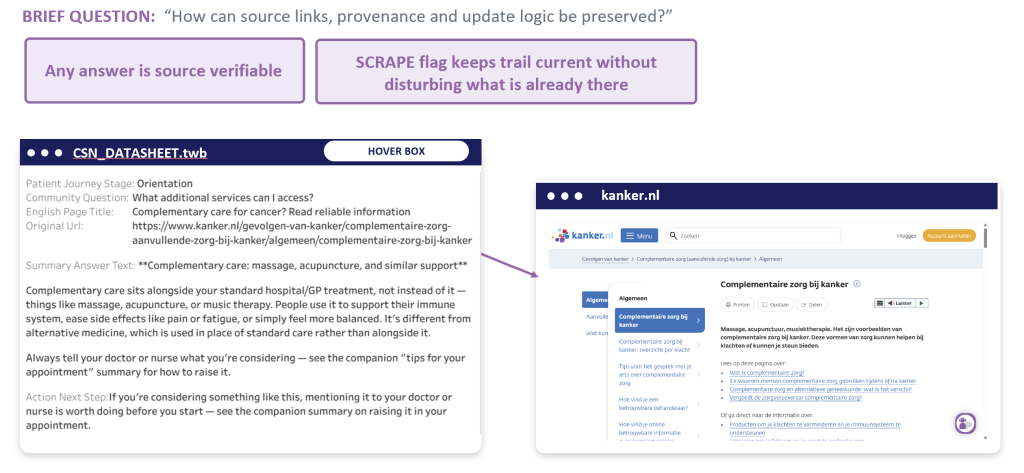
The whole workflow lives in one Excel file. CSN adds a URL, flags it SCRAPE, runs the pipeline, then reviews and finalises the drafted text. Only flagged rows are reprocessed, so manual corrections are never overwritten. Two notebook runs showed both ends of this: Run 1 built everything from scratch, while Run 2 passed the 144 hand-corrected rows through untouched with zero new translation calls. A Final QA checklist blocks the export if any row is still unclassified. The full toolchain costs CSN €0 at current scale.
STEP 4: Insights
A Tableau dashboard let CSN explore every coverage and gap question live.
Fig 1: Dashboard overview, unfiltered and filtered to kanker.nl
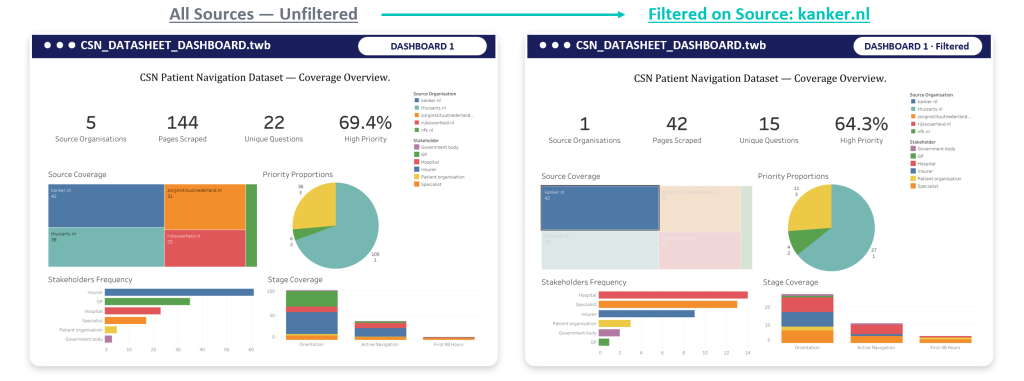
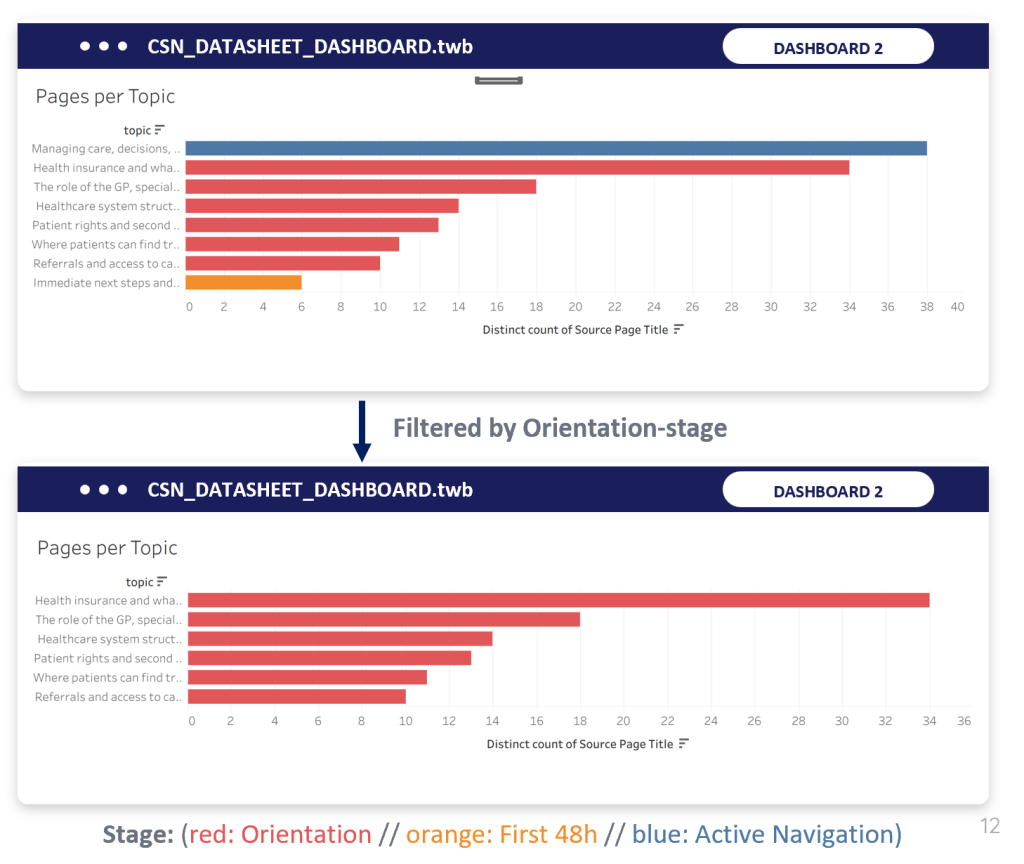
Firstly, Orientation is the dataset’s strongest area. It accounts for 100 of 144 pages, led by health insurance (34), the roles of GP, specialist and hospital (18) and healthcare system structure (14).
Fig 2: Pages per topic, Orientation stage
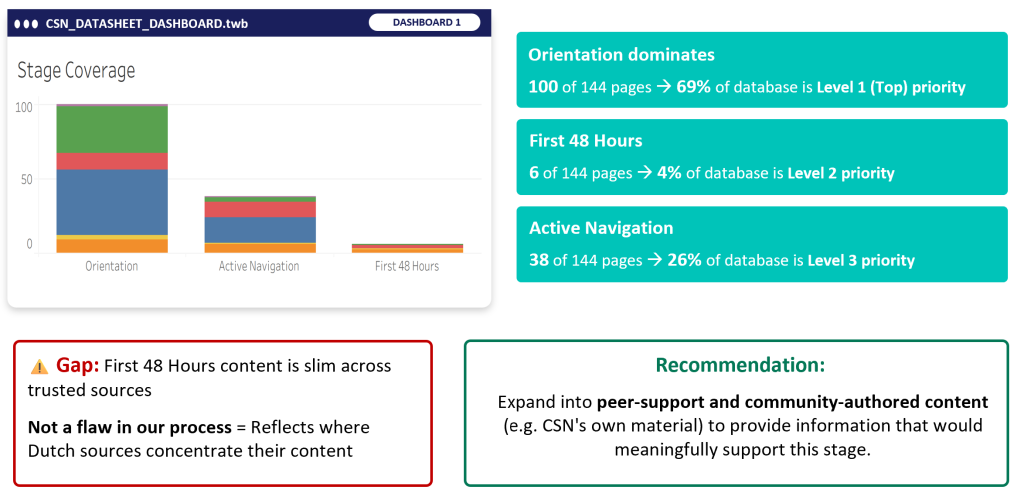
Secondly, First 48 Hours is a genuine gap. Only 6 pages (4%) cover what is arguably the most acute point of a patient’s journey, against 38 for Active Navigation. This reflects where Dutch institutions publish, not a flaw in the process.
Fig 3: Stage coverage
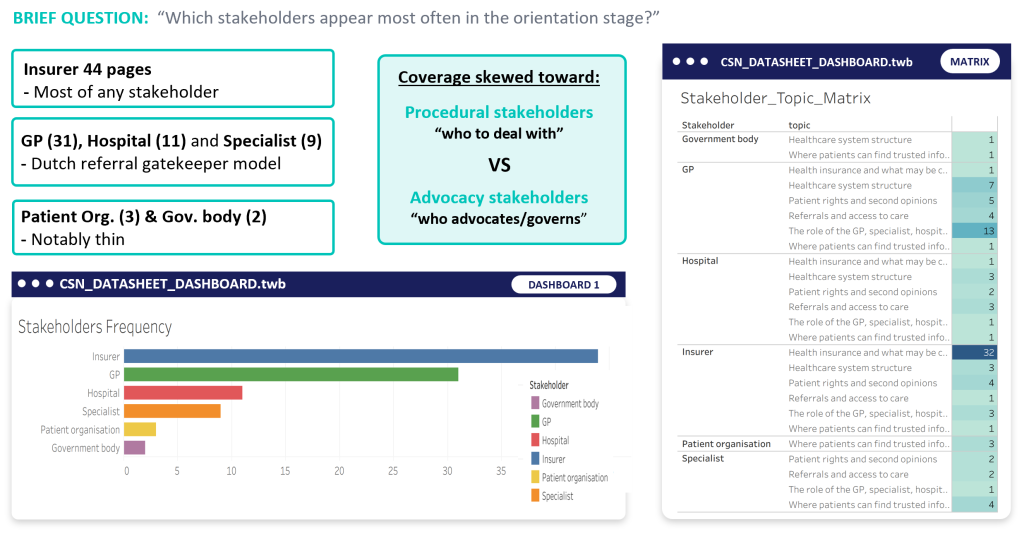
Thirdly, within Orientation, coverage is procedural. Insurers (44) and GPs (31) dominate, while patient organisations (3) and government bodies (2) are barely present. The sources explain how the system works far more than they explain who advocates for the patient.
Fig 4: Orientation stakeholder coverage
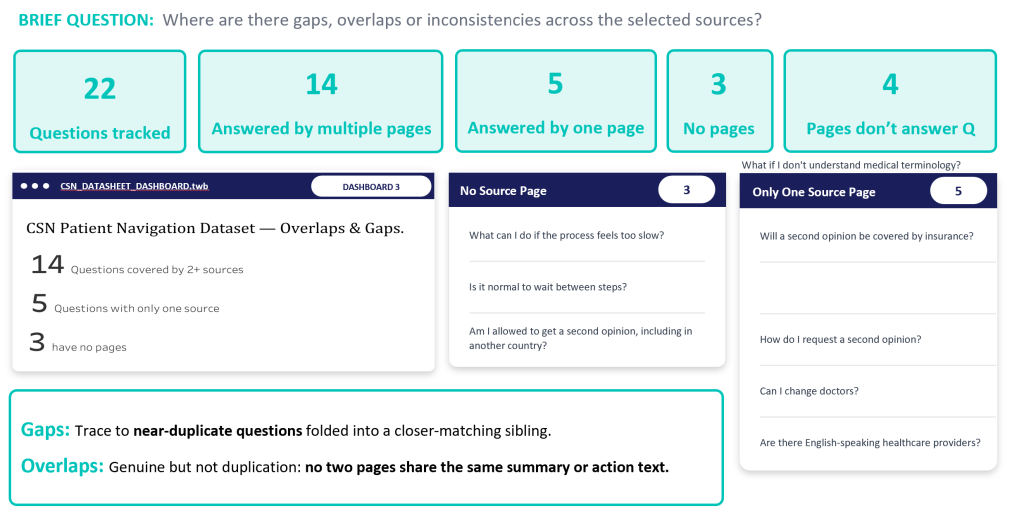
Finally, source overlap is a strength. Fourteen of the 22 questions are answered by several sources, each from a distinct angle, with no repeated summary text. Only three questions have no source, and each sits beside a near-duplicate sibling that does. kanker.nl is the only source with wide coverage, answering 15 of the 22 questions.
Fig 5: Gaps and overlaps
STEP 5: Impact
Recommendations for CSN:
- Source peer-support and community-authored content, such as CSN’s own material, for First 48 Hours before expanding Orientation further.
- If the Navigator launches with a subset of content, prioritise insurance, GP/specialist/hospital roles and system structure.
- Consider dedicated patient-advocacy content, since official sources default to procedure.
- Close the source-list gap on “trusted information”, where only kanker.nl and nfk.nl contribute.
Because topic, stage, stakeholder and question are tagged independently, the same dataset could power a website, chatbot or app. A Glide mock-up (illustrative only) showed this, letting a patient browse by stage or topic, or search in free text.
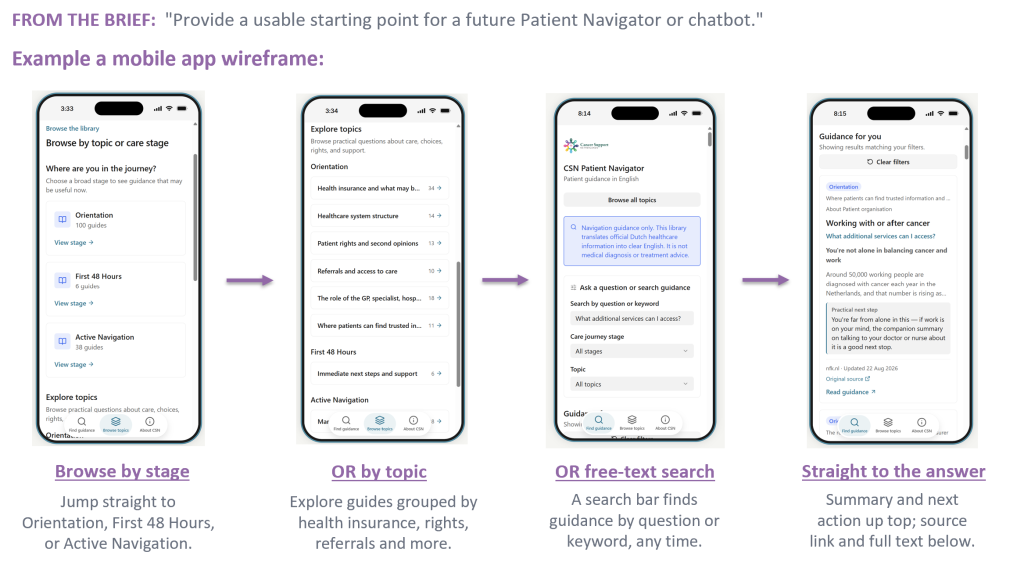
Essentially, every answer links back to its Dutch source page – the navigator points to original sources – it does not offer medical advice of its own.
To view the Jupyter notebook file – please click here. To view the presentation – please click here.